Apex domain with fault tolerance
In the post about high availability we described where it doesn't apply: domains connected via A records. A subdomain is easy to switch to a CNAME, but an apex domain like example.com cannot use one: DNS rules don't allow a CNAME at the zone apex. We recommended moving the site to www.example.com and setting up a redirect from the apex manually through a gateway.
Now there's nothing to do manually: when you add an apex domain, the dashboard offers this option and configures the redirect for you.
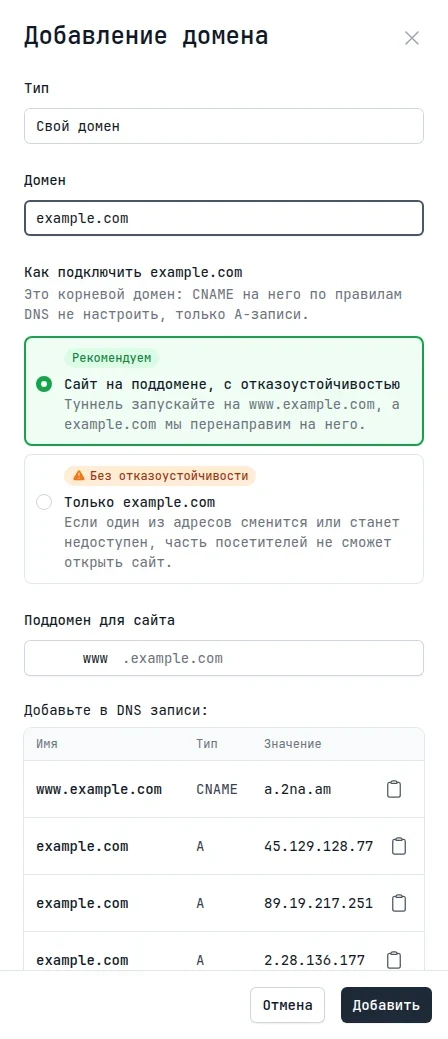
New domain
When you add an apex domain, the dashboard offers two options:
- Site on a subdomain, with fault tolerance. This is the recommended option. The tunnel runs on
www.example.comor another subdomain, such asshop.example.com. The subdomain is connected via CNAME and works with fault tolerance. The apex is connected via A records. Once both domains pass DNS verification, Tuna automatically creates a gateway with a permanent redirect fromexample.comto the subdomain. - Only example.com. Same as before: A records, tunnel on the apex, no fault tolerance.
After adding the domains, the dashboard shows both DNS records and the command to start the tunnel:
tuna http 8080 --domain=www.example.com
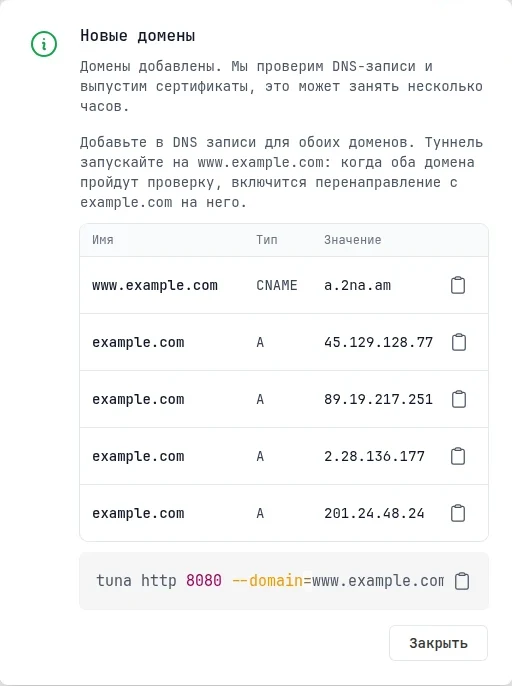
The redirect is permanent (308) and preserves the path: example.com/catalog opens www.example.com/catalog. Browsers remember this redirect, so visitors who have been to the site before go straight to the subdomain.
In CLI 0.39 and later, a single command adds the same pair and prints the DNS records and tunnel command:
tuna domain reserve example.com --redirect-to=www.example.com
The domain pair takes two slots in your custom domain limit. If only one slot is available, the subdomain option will be unavailable, and a link to upgrade your subscription will appear.
On the Pro plan, custom domains are now 10 instead of 1 — the same number as reserved subdomains. Static TCP ports are now 5 instead of 1, matching the number of tunnels you can run simultaneously.
Already connected domain
Apex domains connected earlier and subdomains on A records are now marked with a warning icon in the list. The apex domain card includes a step-by-step migration:
- add a subdomain — the dashboard shows the CNAME record;
- start the tunnel on the subdomain instead of the apex;
- enable the redirect.
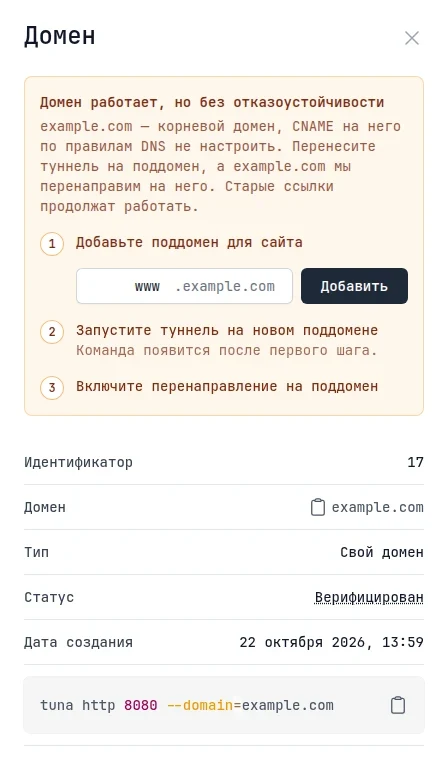
Old links will keep working: visitors from example.com will land on the same pages on the subdomain.
If you have a subdomain on A records (not an apex), no migration is needed. Replace the A records with a single CNAME record from the domain card — the tunnel and settings stay the same.
Things to keep in mind
- The query string is not preserved during the redirect yet:
example.com/?utm_source=mailopenswww.example.com/. Use the subdomain directly in links with UTM tags in newsletters and ads. - The redirect itself works via A records, so it doesn't have fault tolerance. The site behind the redirect is what's fault-tolerant.
Step-by-step guide — in the article Connecting a custom domain.
Leave feedback
If you enjoy using Tuna, or on the contrary you are not happy with something, please leave feedback.
News
We announce new features and posts on our Telegram channel. Subscribe so you don't miss anything.
Help
We value our users and carefully review every request. If you have any problems with tuna, please contact us in one of the following ways: