Contacts
Contacts are groups of notification recipients. Each group can contain email addresses and integrations (Telegram, Slack, etc.).
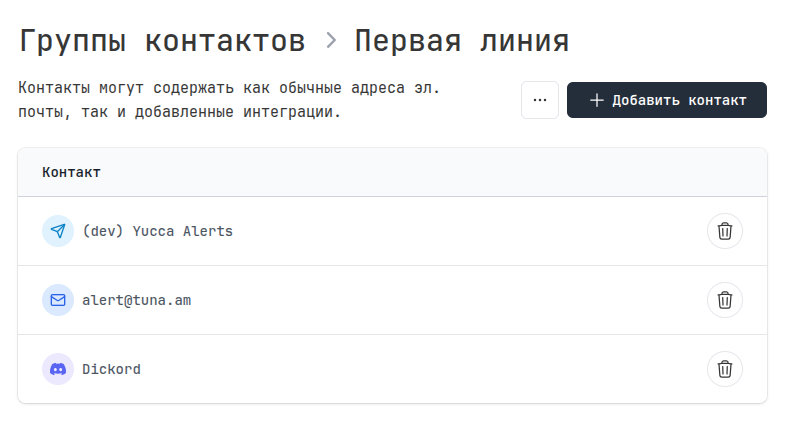
Concept
The notification system is built on three levels:
┌────────────────────────┐     ┌──────────────────┐     ┌──────────────────────┐
│   Monitor or report    │────▶│  Contact group   │────▶│    Contact           │
│                        │     │   "DevOps"       │     │ (email/integration)  │
└────────────────────────┘     └──────────────────┘     └──────────────────────┘
- Monitor or report — event source
- Contact group — a set of recipients for a specific purpose
- Contact — a specific recipient (email or integration)
This structure allows you to:
- Flexibly manage notification recipients
- Use the same group for multiple monitors
- Easily add/remove recipients
Contact groups
A contact group is a named set of notification recipients.
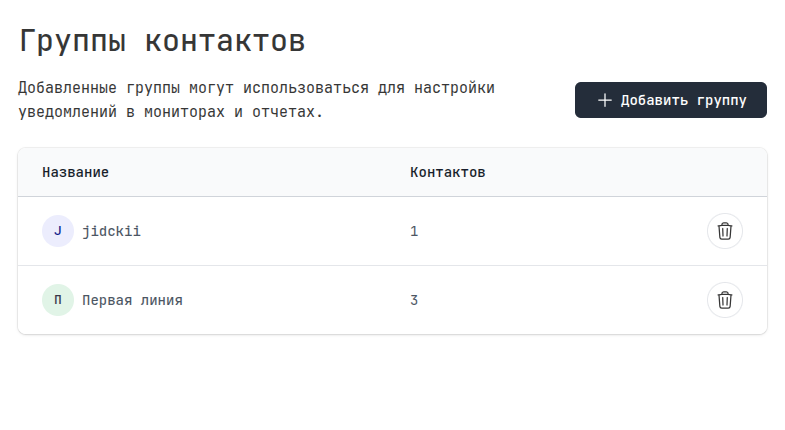
Usage examples
| Group | Purpose | Contacts |
|---|---|---|
| DevOps | Critical services | Team email, Telegram, Slack #alerts |
| First line | All alerts | Support email |
| Backend | Backend services | Developers' Telegram |
| Night on-call | Night alerts | On-call engineer's Telegram |
Contact types
| Type | Icon | Description |
|---|---|---|
| Email address | ||
| Telegram | Telegram chat/group | |
| Slack | Slack channel | |
| Discord | Discord channel | |
| VK Teams | VK Teams chat | |
| Google Chat | Google Chat | |
| Webhook | Arbitrary HTTP endpoint |
Related sections
- Integrations — configuring notification channels
- Monitors — alerts on triggers
- Reports — notifications about new reports