Traffic Policies
Overview
This feature allows you to describe rules and actions for processing traffic for incoming requests and more flexibly configure interaction with your application.
Available only with a subscription on the Legend plan.
To understand why policies are needed and how they work, let's look at an example of enabling basic authorization only for the /admin prefix:
---
rules:
  - name: Authorization for admin panel
    expressions:
      - req.URL.Path contains "/admin"
    actions:
      - name: Enable basic auth
        type: basic_auth
        config:
          userList:
            admin: password
Here we have described 1 rule (rules), it has an expression (expressions), it contains a condition in which we check that the request is intended for the /admin prefix, if the condition is true, an action occurs (actions), in the example we apply basic authorization, set a list of username, password pairs. If the user passes authorization, then traffic is directed to your service. This rule will allow you to open access to the site under development for everyone, for example for customers or colleagues, but at the same time you can restrict access to private parts of the site. This is just one example, below you will find a complete description and more live examples.
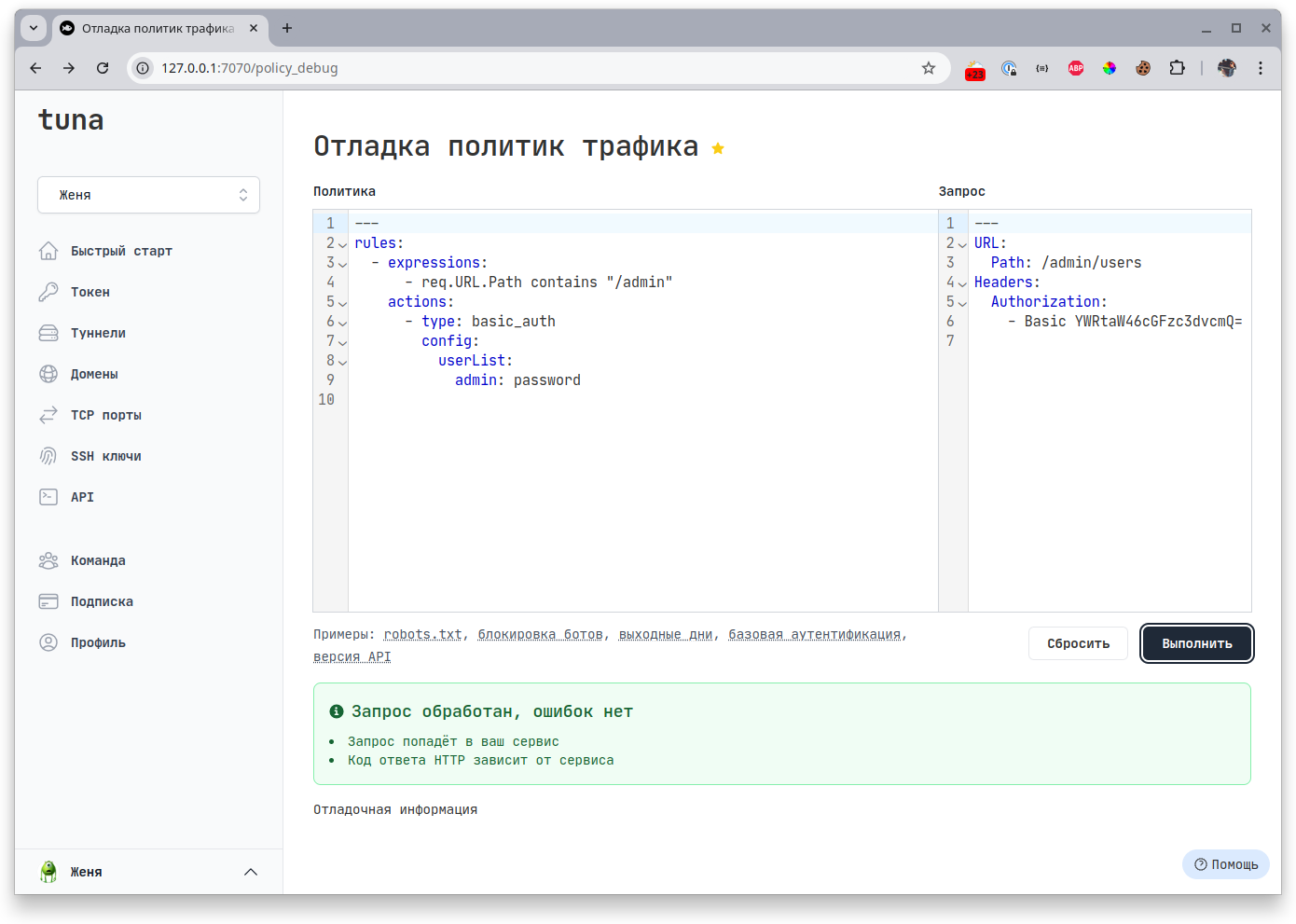
To make it easier for you to write the necessary rule, we added a debugger right in the dashboard, where you can check if the rule works correctly, and several examples are also provided:
Rules
Rules consist of actions - actions (required), which must take effect and expressions - expressions (optional), filtering traffic to which they are applied. Rules are evaluated and executed sequentially in the order they are described, without interrupting their execution. That is, if a request falls under several rules at once, all actions will also be applied to this request. You can also specify a name name. Rules are written in YAML, see below for where they are stored.
For example, there are 2 rules. In the first one we enable basic authorization for all requests to the /admin prefix.
In the second one we check if there is an Accept-Language header and if it contains Russian language ru-RU. The client must first enter username and password, and then the ban by Accept-Language header will work if the header value contains ru-RU.
---
rules:
  - expressions:
      - req.URL.Path contains "/admin"
    actions:
      - type: basic_auth
        config:
          userList:
            admin: admin
  - expressions:
      - any(req.Headers["Accept-Language"], {# matches "ru-RU"})
    actions:
      - type: deny
Expressions
Website with syntax description expr-lang
Expressions are based on expr-lang syntax. This is a rich language with many functions, comparison operations, inclusion, string operations and much more. Listing expressions in a list is perceived as a logical AND (and).
Example of blocking POST requests from bots:
---
rules:
  - expressions:
      - lower(req.UserAgent) matches "(chatgpt-user|gptbot)"
      - req.Method in ["POST"]
    actions:
      - type: deny
Variables with request data
To work with an incoming request, there are several variables for getting information or metadata:
| Name | Description |
|---|---|
| req.Proto | Contains the HTTP protocol version that was used when sending the request (for example HTTP/1.1 or HTTP/2.0) |
| req.Host | Contains the URL host, including the port if specified (alias for req.URL.Host) |
| req.Method | Contains the request method GET / POST and others |
| req.URL | Full request URL (has its own methods, which are described in the table below) |
| req.UserAgent | Content of the User-Agent header |
| req.RemoteAddr | Client IP address from which the request came |
| req.ContentLength | Returns the length of the request body in bytes, if known, taken from the Content-Length header. |
| req.Headers | List of all headers |
Variables inside req.URL allow you to get individual parts of the URL:
| Name | Description |
|---|---|
| req.URL.Scheme | Contains the URL scheme, which defines the protocol (for example, http, https, ftp, etc.). |
| req.URL.Opaque | Contains opaque (encoded) URL data that cannot be directly parsed into parts such as scheme, host and path. |
| req.URL.User | Contains user information, containing username and possibly password in the URL. |
| req.URL.Host | Contains the URL host, including the port if specified (for example, example.com:8080). |
| req.URL.Path | Contains the URL path, which points to a specific resource (for example, /articles/2024/). |
| req.URL.RawPath | Contains the encoded version of the path (if it differs), may be useful for cases where the path contains special characters. |
| req.URL.RawQuery | Contains encoded query parameters without the ? character (for example, name=John&age=30). |
| req.URL.Fragment | Contains the URL fragment, which points to a specific part of the document, without the # character (for example, section2). |
| req.URL.RawFragment | Contains the encoded version of the fragment if it contains special characters (for example, spaces or Unicode characters). |
Request metadata:
| Name | Description |
|---|---|
| meta.Time | Exact time when the request arrived, +- current time |
| meta.RequestID | Unique request identifier |
Built-in functions
In addition to the fairly rich expr-lang syntax, built-in functions are also available for quick work with data.
| Name | Description | Example |
|---|---|---|
| IpInRange | Checks if an IP is in a subnet | IpInRange(req.RemoteAddr, "127.0.0.0/8") |
| IsIPV6 | Checks if a string is an IPv6 address | IsIPV6(req.RemoteAddr) |
| IsIPV4 | Checks if a string is an IPv4 address | IsIPV4(req.RemoteAddr) |
| IsIP | Checks if a string is an IP address | IsIP(req.RemoteAddr) |
| RandInt | Generate a random integer | RandInt(0, 10) |
| RandDouble | Generate a random decimal number in the range from 0 to 1 | RandDouble() |
Expression examples
Check that the request came via https:
- expressions:
    - req.URL.Scheme == "https"
Request contains the /admin prefix:
- expressions:
    - req.URL.Path contains "/admin"
Request is not from subnet 10.0.0.0/8:
- expressions:
    - not IpInRange(req.RemoteAddr, "10.0.0.0/8")
Actions
Execution of actions depends on whether the condition in expressions is true, if the expression is missing, then the action is always executed.
The action must contain a type type and configuration config (not always required). You can also specify a name name.
Action types
Several types of actions are available, some modify the request, others are responsible for independent processing. You can specify multiple types, they will be processed in order.
add_headers
Add headers.
You can add headers both when passing them to the upstream application context: request, and when responding to the client context: response.
The keyword headers defines a key=value map, where the key is the header name, and the value is the header content.
---
rules:
  - actions:
      - type: add_headers
        config:
          context: request
          headers:
            foo: bar
            qwe: rty
  - actions:
      - type: add_headers
        config:
          context: response
          headers:
            foo: bar
            qwe: rty
remove_headers
Remove headers.
You can remove headers both when passing them to the upstream application context: request, and when responding to the client context: response.
The keyword headers defines a list of headers.
---
rules:
  - actions:
      - type: remove_headers
        config:
          context: request
          headers:
            - foo
            - qwe
  - actions:
      - type: remove_headers
        config:
          context: response
          headers: ["foo", "qwe"]
basic_auth
Enable basic authorization.
The keyword userList defines a key=value map, where the key is username, and the value is password.
---
rules:
  - actions:
      - type: basic_auth
        config:
          userList:
            admin: admin
            foma: kiniaev
            ащьф: лштшфум
url_rewrite
Rewrite URI.
The keyword from defines the path from which the request to the upstream server should be rewritten, and to defines the path that will be passed to the upstream server. Regular expressions also work.
---
rules:
  - actions:
      - type: url_rewrite
        config:
          from: /foo
          to: /bar
redirect
URL redirect.
The keyword to defines the Location to redirect to, you can also override statusCode (default 307).
The keyword headers defines a key=value map, where the key is the header name, and the value is the header content.
---
rules:
  - actions:
      - type: redirect
        config:
          to: /foobar
          statusCode: 304
          headers:
            foo: bar
deny
Prohibit access to the upstream application.
You can override statusCode (default 403).
---
rules:
  - actions:
      - type: deny
        config:
          statusCode: 451
restrict_ips
Restrict access by subnets.
The keyword allow defines a list of subnets from which access is allowed.
The keyword deny defines a list of subnets from which access is prohibited.
---
rules:
  - actions:
      - type: restrict_ips
        config:
          allow:
            - 127.0.0.1/32
          deny:
            - 10.0.0.10/32
rate_limit
Limit access by number of requests.
The keyword rate defines the time interval, and capacity the number of requests that can be made. When this threshold is exceeded, the client will start receiving 429 Too Many Requests.
---
rules:
  - actions:
      - type: rate_limit
        config:
          rate: "60s"
          capacity: 2
custom_response
Custom response.
The required parameter statusCode defines the HTTP status. You can also pass a body, the content is set in the content parameter.
And headers, headers defines a key=value map, where the key is the header name, and the value is the header content.
---
rules:
  - actions:
      - type: custom_response
        config:
          statusCode: 200
          content: |
            User-agent: *
            Disallow: /
          headers:
            content-type: "text/plain"
reverse_proxy
Reverse proxy to another service.
With this action, you can direct individual requests to a third-party service - this can be useful, for example, when developing microservices.
The required parameter url specifies an alternative point for the reverse proxy, the optional parameter onError defines the behavior when the request could not be passed to the third-party service:
halt(default) - request processing will be interrupted on error;continue- the request will be processed further according to downstream rules.
Standard behavior:
---
rules:
  - actions:
      - type: reverse_proxy
        config:
          url: "http://127.0.0.1:8000"
With the onError parameter set to continue:
---
rules:
  - actions:
      - type: reverse_proxy
        config:
          url: "http://127.0.0.1:8000"
          onError: continue
      - type: custom_response
        config:
          statusCode: 500
          content: Unavailable
In this case, if the resource http://127.0.0.1:8000 is unavailable, HTTP 500 and the text Unavailable will be returned in response to the request.
compress_response
Compress the response.
Compresses the response if the upstream application did not do it itself. The optional parameter algorithms defines the list of allowed algorithms: gzip, deflate, br, zstd (all four by default). Any other value fails policy validation.
---
rules:
  - actions:
      - type: compress_response
        config:
          algorithms: [br, gzip]
      - type: reverse_proxy
        config:
          url: "https://example.com"
The action does not respond to the client by itself. It compresses the response produced by the following actions and rules (reverse_proxy, custom_response and others), so it must be placed before the action that produces the response. If several compress_response actions match, the first one applies.
The algorithm is chosen from the client's Accept-Encoding header, taking q weights and * into account. With equal weights, the algorithm listed earlier in the header wins. If the client does not ask for any of the allowed algorithms or rejects them with q=0, the response is sent uncompressed.
When compressing, the Content-Encoding and Vary: Accept-Encoding headers are added to the response, and Content-Length and Accept-Ranges are removed. A strong ETag becomes weak (W/"..."). The response is compressed on the fly without buffering, so SSE and streaming responses keep working: events are not held back.
The response is not compressed if:
- it already has a
Content-Encodingheader; - it is a partial response (
Content-Range); - the request method is
HEAD; - the response status is 1xx, 204 or 304;
- the connection switches to WebSocket or another protocol via
Upgrade; - the content is already compressed by nature:
image/*(except SVG),video/*,audio/*,font/woff*, archives (zip, gzip, 7z, rar, bzip2, xz, lzma, zstd, brotli).
To check compression, send a GET request (curl -I sends HEAD, and such a response is not compressed):
curl -s -o /dev/null -D - -H 'Accept-Encoding: br' https://<domain>/
The response headers should contain content-encoding: br and vary: Accept-Encoding. Without the Accept-Encoding header the response comes uncompressed.
Where rules are stored
By default rules are read from the .tuna.yml file in the current directory. The path can be overridden with the --policy-file flag or the TUNA_POLICY_FILE environment variable.
Loading from a URL
Starting with version 0.36.0, rules for tuna http can be loaded from a URL with the --policy-url flag or the TUNA_POLICY_URL environment variable. This lets you keep one policy in a repository or storage and use it on different machines:
tuna http 8080 --policy-url=https://gitlab.com/example/policies/-/raw/main/policy.yml
- The URL must be
https.httpis allowed only forlocalhost,127.0.0.1and::1. - Redirects are followed (up to 10), each one is checked by the same rule.
- The format is YAML or JSON with the same structure as
.tuna.yml. Onlyrulesis taken from the response, other fields are ignored. - The response must be
200, non-empty and no larger than 1 MB. The timeout is 15 seconds. - The policy is loaded once at startup. Restart the tunnel to apply changes.
- With
--policy-urlthe local.tuna.ymlis not read for the policy. The flag cannot be combined with--policy-fileorTUNA_POLICY_FILE.
A policy loaded from a URL can do everything a local one can, including proxying requests into your local network with reverse_proxy. Load it only from a source you trust.
Policy errors
Starting with version 0.36.0, the tunnel does not start if the policy fails to load:
- the file set in
--policy-fileorTUNA_POLICY_FILEis not found; - the file, including the default
.tuna.yml, cannot be parsed; - the URL response failed to load or cannot be parsed.
If there is simply no .tuna.yml in the current directory, the tunnel starts without a policy.
A tunnel with a policy starts only with a subscription on the Legend plan, otherwise tuna exits with Traffic policy is available only in Team subscription. The subscription is checked at startup: if it expires while the tunnel is running, the tunnel and its policy keep working until restart. Earlier versions of tuna printed a warning in both cases and started the tunnel anyway.
Examples
Block requests by headers
Block requests if there is no X-Api-Version header, and respond with HTTP 400 if below 3:
---
rules:
  - name: Block API v0
    expressions:
      - len(req.Headers["X-Api-Version"]) == 0
    actions:
      - name: Deny
        type: deny
  - name: 400 on API v1 and v2
    expressions:
      - req.Headers["X-Api-Version"][0] in ["1", "2"]
    actions:
      - name: Respond with 400 JSON
        type: custom_response
        config:
          statusCode: 400
          headers:
            content-type: "application/json"
          content: |
            {"msg":"You are using an old API version, minimum version is 3"}
Reverse proxy to third-party services by prefix and headers
Redirect requests to /v1 to a third-party service on port 8000, and requests with User-Agent containing mobile to the service on port 3000.
At the same time, the command tuna http 8080 by default proxies all requests to 8080.
---
rules:
  - expressions:
      - hasPrefix(req.URL.Path, "/v1")
      - lower(req.UserAgent) contains "mobile"
    actions:
      - type: reverse_proxy
        config:
          url: "http://127.0.0.1:3000"
  - expressions:
      - hasPrefix(req.URL.Path, "/v1")
    actions:
      - type: reverse_proxy
        config:
          url: "http://127.0.0.1:8000"
Custom response on weekends
---
rules:
  - expressions:
      - now().Weekday().String() in ["Saturday", "Sunday"]
    actions:
      - type: custom_response
        config:
          statusCode: 200
          content: Take a rest!
Basic authentication
---
rules:
  - expressions:
      - req.URL.Path contains "/admin"
    actions:
      - type: basic_auth
        config:
          userList:
            admin: password
Multiple actions without expressions
Restrict requests from 127.0.0.1 and 10.0.0.10, and for all others limit the number of requests per second to 2.
---
rules:
  - actions:
      - type: restrict_ips
        config:
          allow:
            - 127.0.0.1/32
          deny:
            - 10.0.0.10/32
  - actions:
      - type: rate_limit
        config:
          rate: "1s"
          capacity: 2
Rewrite with regular expression
---
rules:
  - expressions:
      - hasPrefix(req.URL.Path, "/blog")
    actions:
      - type: url_rewrite
        config:
          from: "/blog/([0-9]+)/([a-zA-Z]+)/"
          to: /index.php?p=$1&title=$2"