tuna ❤️ Minecraft
Minecraft - a popular indie sandbox computer game.
Tuna will help you open access to Minecraft (java edition) on your local network. We wrote detailed instructions on how to run a Minecraft server locally in Docker and open access to friends using Tuna, on any operating system.
To publish Minecraft, you need to create a TCP tunnel, which is only available with a subscription.
But you don't necessarily have to run your own Minecraft server to play with friends - you can simply open access to your game:
Step 1. Launch Minecraft (java edition)
- Create a Single Player Game
- Press esc
- Select Open to LAN
- Set a port, for example
45678 - Click Start LAN World
Step 2. Install the tuna client
Instructions are available on the installation page.
Step 3. Run tuna
Execute:
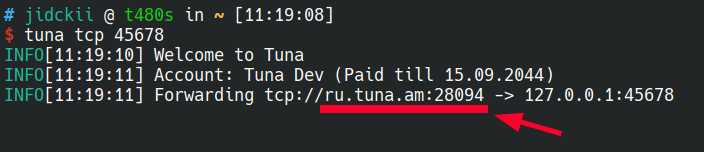
tuna tcp 45678
Share the connection link with your friends as in the example, without the tcp:// scheme:
If you need to know the real IP of clients, some builds, for example Velocity, support Proxy Protocol.
You need to enable it in the game config and in the tuna client.
In the argument you need to pass version 1 or 2, which corresponds to the Proxy Protocol version: 1 is text, 2 is binary.
tuna tcp 45678 --proxy-protocol=1
# or
tuna tcp 45678 --proxy-protocol=2