MySQL tunnel
Available only with a subscription.
Overview
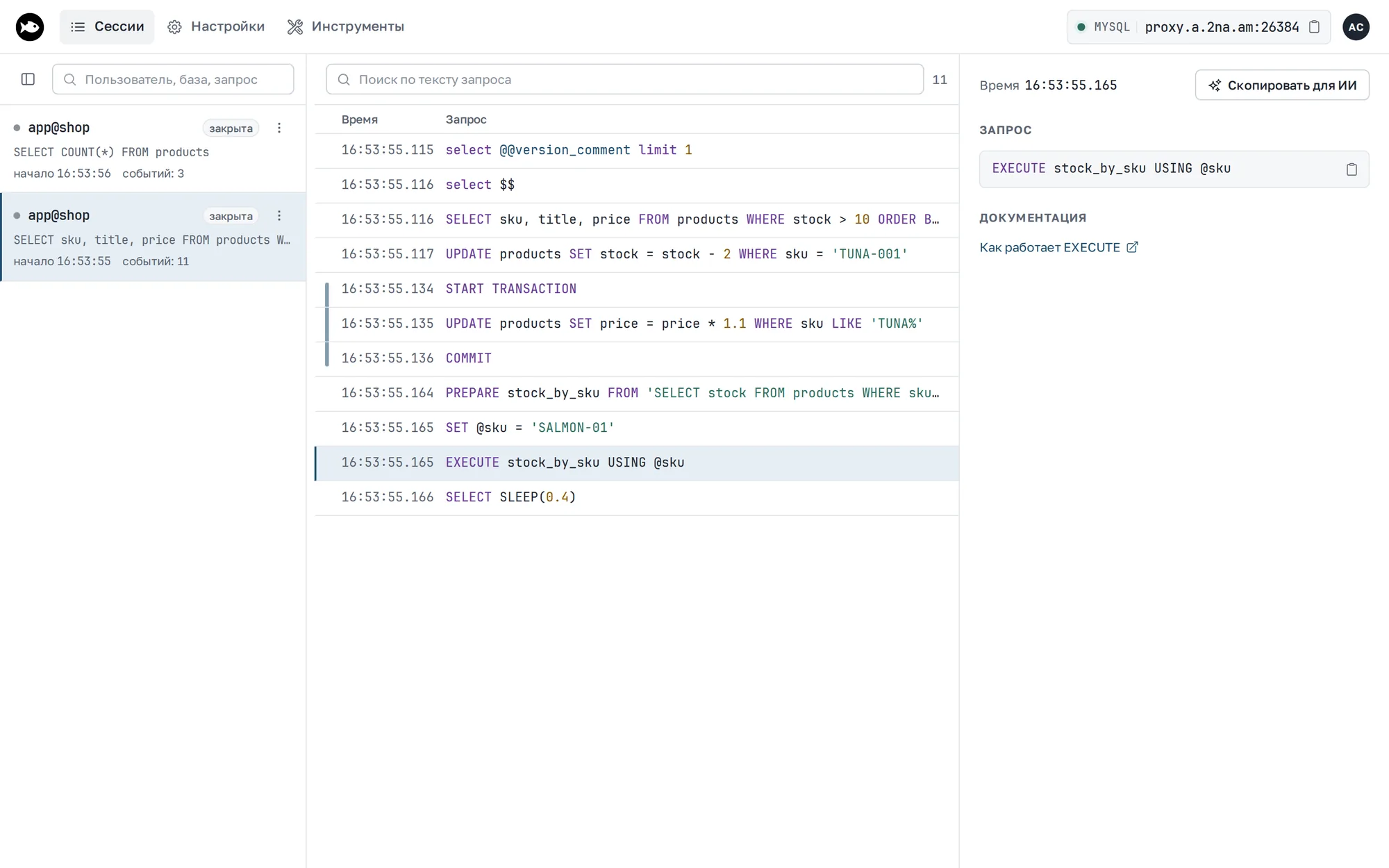
A MySQL tunnel gives access to a MySQL or MariaDB database and shows SQL queries in the inspector: sessions as user@database, text queries, prepared statements (Prepare, Execute, Fetch, Close), USE, CREATE DATABASE and DROP DATABASE, KILL, and REFRESH. You can download a session as an SQL file.
tuna doesn't parse server responses, so unlike the Postgres tunnel, the inspector shows no row counts or server errors.
Authentication passes through the tunnel unchanged: every login method works, including mysql_native_password, caching_sha2_password, ed25519, and parsec (MariaDB 11.6 and later), and tuna never sees the password.
MySQL tunnels are meant for debugging and for use locally or in test environments, and they don't support TLS. We don't recommend using this tunnel type in production.
As with Postgres and Redis, tuna shows a full-screen interface in the terminal with sessions and SQL queries.
Connecting a client
The tunnel doesn't support TLS, so turn it off in the client.
MySQL 8:
mysql -h <address> -P <port> -u root -p --ssl-mode=DISABLED --get-server-public-key
MariaDB:
mariadb -h <address> -P <port> -u root -p --skip-ssl
Without these flags, a client that requires TLS can't connect:
- MySQL with
--ssl-mode=REQUIRED—SSL is required but the server doesn't support it; - MariaDB 11.4 and later requires TLS by default —
ERROR 2026 (HY000): SSL is required, but the server does not support it.
mariadb-admin, mariadb-dump, LOAD DATA LOCAL INFILE, and multi-statement queries work through the tunnel. The client can turn on --compress, but queries go through the tunnel uncompressed.
MySQL 8 and caching_sha2_password
In MySQL 8, users log in with the caching_sha2_password plugin by default. Without TLS, such a user's first login requires the server's RSA key, so the client needs the --get-server-public-key flag. Without it, the login fails:
ERROR 2061 (HY000): Authentication plugin 'caching_sha2_password' reported error: Authentication requires secure connection.
In drivers, a connection parameter does the same, for example allowPublicKeyRetrieval=true in the Go driver and JDBC.
After the first successful login, the server keeps the password hash until it restarts, and later logins don't need the key. Users with mysql_native_password and MariaDB servers don't need the flag.
Changing the user
The tunnel rejects changing the user within a connection (COM_CHANGE_USER). To log in as another user, reconnect.
Examples
You can view all current flags, hints, and examples by calling help:
tuna mysql --help
Almost all flags have corresponding environment variables.
Basic example
Without arguments, the tunnel connects to port 3306:
tuna mysql
With IP address
tuna mysql 10.0.0.1:3306
Specifying an API key
You can specify a different API key using the --api-key flag or the TUNA_API_KEY environment variable; the key needs the tunnels:connect scope. Overriding follows the configuration ordering policy.
tuna mysql 3306 --api-key=tak_***
Static port
The value of the --port/-p flag can be an alias or an assigned port.
You can reserve ports in the dashboard, and after restarting the tunnel the address will remain the same.
For more details about ports, see the dedicated guide.
tuna mysql 3306 --port=mysql
tuna mysql 3306 --port=35000
Restricting access by IP subnet
You can allow only certain subnets in CIDR format:
tuna mysql 3306 --cidr-allow="10.0.0.1/32"
Or deny access from certain subnets:
tuna mysql 3306 --cidr-deny="10.0.0.1/32"
You can combine them, for example, allow a wide network and exclude individual IPs:
tuna mysql 3306 --cidr-allow="10.0.0.1/24" --cidr-deny="10.0.0.33/32"
Background service and multiple tunnels
You can install a MySQL tunnel as a background service:
tuna service install --name=db -- tuna mysql 3306 --port=mysql
Or describe it in .tuna.yml for tuna start:
tunnels:
  mysql:
    commandLine: tuna mysql 3306 --port=mysql
Query inspector
The inspector is always on and available at http://127.0.0.1:4040: sessions on the left, queries of the selected session on the right with duration, result and errors. The next tunnel takes port 4041; set a fixed port with --inspect-port or TUNA_INSPECT_PORT. If you don't need the inspector, use a TCP tunnel.
The CLI logs the inspector address and shows it in the header of the terminal UI. More on the inspector page.