Bastion
SSH server with role-based mandatory access control model, using Zero Trust principles. Unlike classic SSH servers, bastion emphasizes user identification, temporary certificates, and role-based access model, providing enhanced security for accessing your servers coupled with simple configuration.

Overview
Currently, this functionality is in open beta testing. It is available to all users with a Team subscription. The format and monetization may change significantly in the future.
What is bastion in the context of SSH access?
Instead of traditional SSH access ssh user@host based on passwords or RSA keys, users authenticate through our tuna client on our portal. Then on the bastion server, certificate-based authentication works, which is a standard OpenSSH feature and the most secure of all, but historically has been the most complex to configure. We take all the complexity upon ourselves, leaving you only with security. After authorization on the portal, the client generates RSA keys and transmits the public part to the API for delivery to bastion servers. The client also generates a temporary PKI certificate which is signed by the CA in the Tuna portal. With the RSA key and certificate, you connect to the server, the server verifies that the certificate is valid, signed by the correct CA, and that the user for whom the certificate was issued has sufficient permissions for access considering roles and policies. Bastion servers in turn also have temporary certificates signed by the CA, and when establishing a connection, the client also verifies the server's validity in the CA, so you're confident that your server is your server and not something fake. As a result, we know nothing about the private keys of servers and clients, they are generated and stored locally, which means we have no ability to connect to your infrastructure, nor do attackers in case of leaks on our side, but we act as a third-party custodian of the CA that signs certificates and authenticates users.
Key principles:
- Role-Based Access Control (RBAC) model — access to SSH servers is managed through roles and policies, not manually through authorized_keys files
- Zero Trust — verifies not only user credentials, but also context - Who is requesting access? Which server and for what purpose? What are the session parameters (time, source, MFA policy)?
- Passwordless authentication — instead of static passwords, in addition to SSH keys, PKI certificates are used that automatically expire.
- (coming soon) Audit and observability — every SSH session is recorded, allowing you to view user actions in real time.
- (coming soon) SSO integration (OAuth, OpenID, SAML, LDAP) — users can authenticate through corporate services such as Google Workspace or Okta.
How does it work in practice?
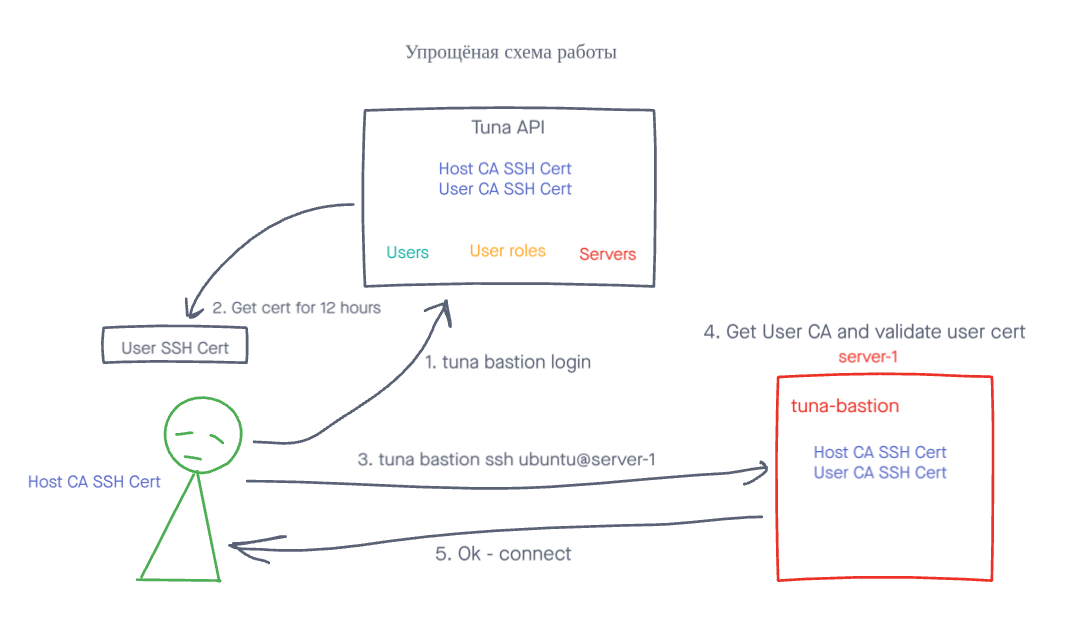
- You run tuna-bastion on your server and register it in the Tuna API. An RSA key pair is generated, along with a 30-day certificate signed by the CA allocated to the team in the Tuna API. The private key is stored locally and not transmitted anywhere, the Tuna API doesn't know it, meaning we have no access to your servers.
- In the control panel my.tuna.am you create a role describing the access model and apply it to the needed user.
- The user runs the command
tuna bastion login usernameon their machine. An RSA key pair is generated, along with a 12-hour certificate signed by the CA allocated to the team in the Tuna API, similar to the server. But this only happens if the user has sufficient permissions to connect with that login. - The user runs the command
tuna bastion ssh username@hostnameand if their certificate is valid, the server certificate is valid, the user has sufficient permissions and no restrictions are imposed, then the session is established.
Guides
3 items
Administrator
5 items
User
3 items