HTTP tunnel
HTTP tunnels work on all pricing plans, but on the free plan only tunnels with dynamically assigned names are available and are limited to 30 minutes of operation.
Overview
HTTP tunnel allows you to provide access to websites, APIs, GraphQL, and Websocket servers.
Examples
You can see all current flags, hints and examples by calling the help:
tuna http --help
Almost all flags have corresponding environment variables.
Basic example
Start a tunnel with a dynamic name.
tuna http 8080
With IP address or Host
tuna http 10.0.0.1:8080
tuna http localhost:8080
Connect to HTTPS resource
tuna http https://localhost:443
If you need to verify certificate validity, specify --tls-skip-verify=false, by default any self-signed certificate is accepted.
With reserved subdomain
Доступно только по подписке.
You can reserve addresses and after restarting the tunnel the address will remain the same:
tuna http 8080 --subdomain=billing
On Unix systems, you can also use the environment variable TUNA_SUBDOMAIN:
TUNA_SUBDOMAIN="billing" tuna http 8080
If you see the error Domain already reserved, it means the domain in this location is already taken by another user, try a different name.
tuna http 8080 --subdomain=any-you-name
Reservation happens automatically when adding the argument. All your reserved domains can be viewed in the dashboard.
With custom domain
Add your domain following the instructions in the dashboard, after DNS verification and Let's Encrypt certificate issuance you can use it:
tuna http 8080 --domain=my-api-project.example.com
There is a detailed article - Connecting your own domain.
HTTPS redirect
You can prohibit HTTP access by adding the --https-redirect flag.
File server
tuna http --file-server ./
Static SPA site hosting
Hosting single page applications:
tuna http --file-server-spa ./
WebDAV server
tuna http --webdav ./
Modifying request headers
Adding a header before the request reaches the local service:
tuna http 8080 --request-header="host:tuna.am"
Modifying response headers
Adding a header for transmission to the client (user):
tuna http 8080 --response-header="env:test"
Basic authentication protection
tuna http 8080 --basic-auth="login:password"
API token protection
tuna http 8080 --key-auth="my-secret-key"
Access to the resource will only be granted if the correct value of the X-Token header is provided.
Rate limiter
Limit the number of requests per second reaching your service:
tuna http 8080 --rate-limit=2
When the limit is reached, the error 429 Too Many Requests will be returned.
IP subnet access restriction
You can define a whitelist of subnets in CIDR format:
tuna http 8080 --cidr-allow="10.0.0.1/32"
Or prohibit access from specific subnets:
tuna http 8080 --cidr-deny="10.0.0.1/32"
User-Agent access restriction
Prohibit access from a specific user-agent and allow from all others, substring match:
--ua-deny=curl
Allow access from a specific user-agent and prohibit from all others, substring match:
--ua-allow=Chrome
Incoming Webhook verification
tuna http 8080 --verify-webhook=gitlab --verify-webhook-secret=1234
С указанием токена
Можно указать специфичный токен через флаг --token или переменную окружения TUNA_TOKEN. Переопределение происходит в соответствии с политикой очерёдности конфигурации.
tuna http 8080 --token=tt_***
С указанием региона для подключения
Можно указать специфичный регион через флаг --location/-l или переменную окружения TUNA_LOCATION. Переопределение происходит в соответствии с политикой очерёдности конфигурации.
tuna http 8080 --location=nl
Генерация QR кода с ссылкой
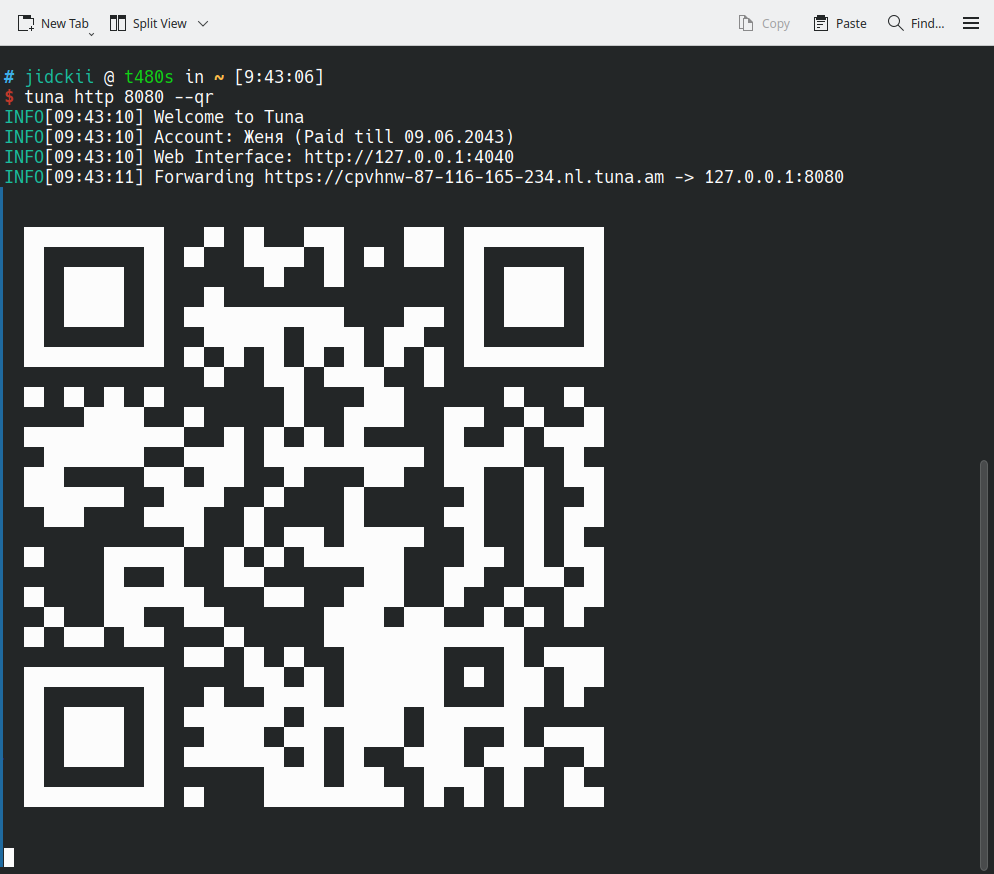
При добавлении флага --qr для ссылки будет сгенерирован QR код и напечатан в консоли. Это может быть удобно если вы тестируете сайт на мобильном устройстве.
Traffic policies
The --policy-file flag specifies the path to the configuration file with rules (default is .tuna.yml).
CORS
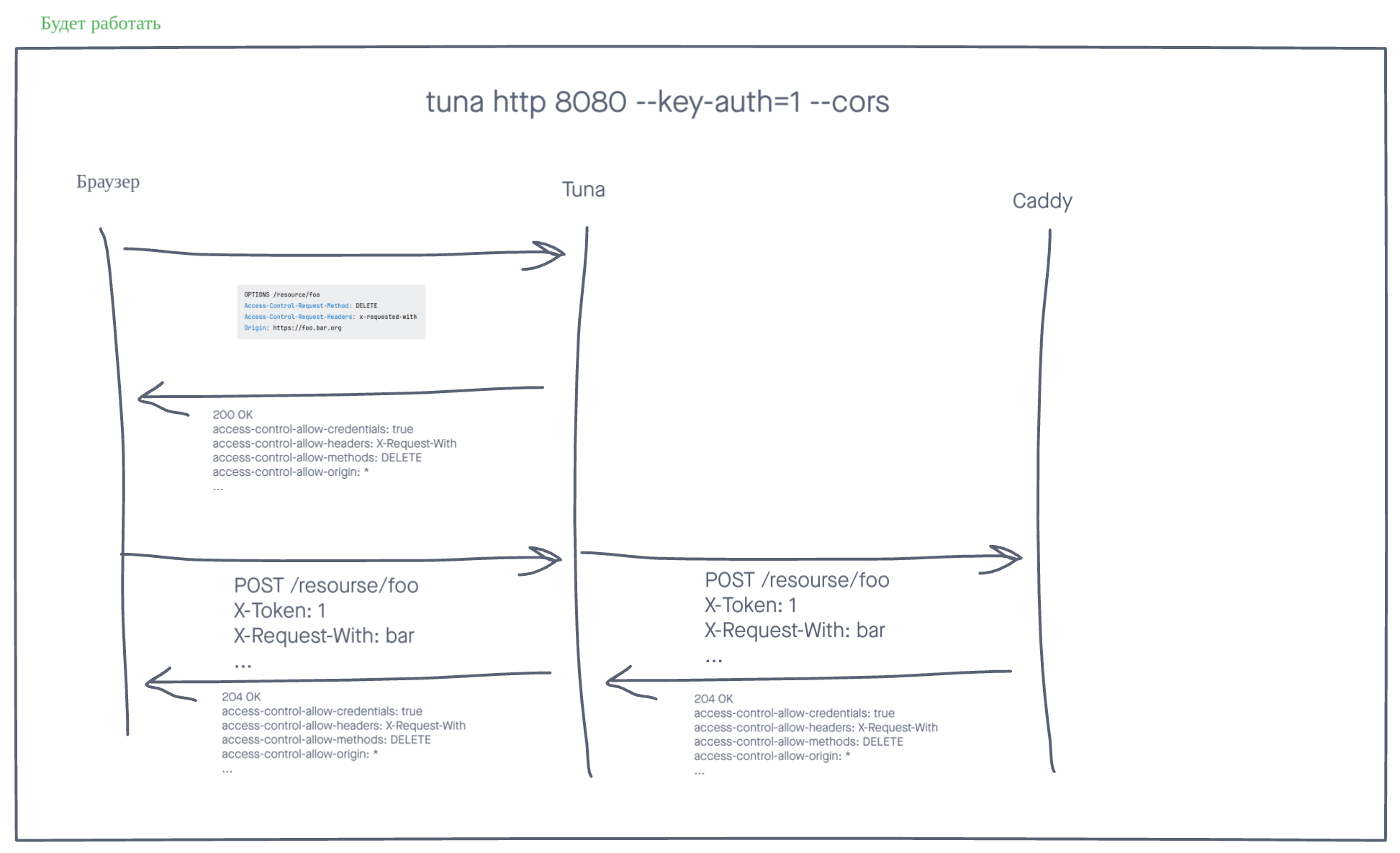
The --cors flag or TUNA_CORS=true variable will add CORS headers to all responses. By default, the following headers are set:
Access-Control-Allow-Credentials: true
Access-Control-Allow-Headers: Accept, Accept-Language, Content-Language, Origin
Access-Control-Allow-Methods: GET, HEAD, POST
Access-Control-Allow-Origin: *
They can be overridden using the --response-header flag.
OPTIONS requests are handled automatically with 200 OK, without reaching the proxied server.
If you have difficulties working with CORS, we recommend reading this article. We also recommend CORS Tester to verify your CORS headers.
Behavior
Hop-by-hop
NOT supported are hop-by-hop headers except for the Connection: upgrade header, which is necessary for Websocket connections.
WebSocket
Supports the protocol with bidirectional connection between client (e.g., browser) and server, no additional settings are required. The transmitted data will NOT be displayed in the inspector.
Server-sent events
Supports the technology of sending notifications from the server to the web browser, no additional settings are required. The transmitted data will NOT be displayed in the inspector.
With the inspector enabled, it's important that the client sends the Accept: text/event-stream header, otherwise the inspector will try to intercept the request and this will cause delays. Browsers send this header by default.
HTTP and HTTPS
When starting the tunnel, an HTTPS link is displayed, but you can also access it via HTTP. You can prohibit HTTP access by adding the --https-redirect flag.
Flag and rule processing order
Flags affecting traffic processing behavior are always executed in a specific sequence, regardless of the order they are passed in the arguments.
- https-redirect
- cors
- cidr-allow
- cidr-deny
- ua-allow
- ua-deny
- rate-limit
- key-auth
- basic-auth
- policy-file
- verify-webhook
- request-header
- response-header
Managing CORS headers yourself
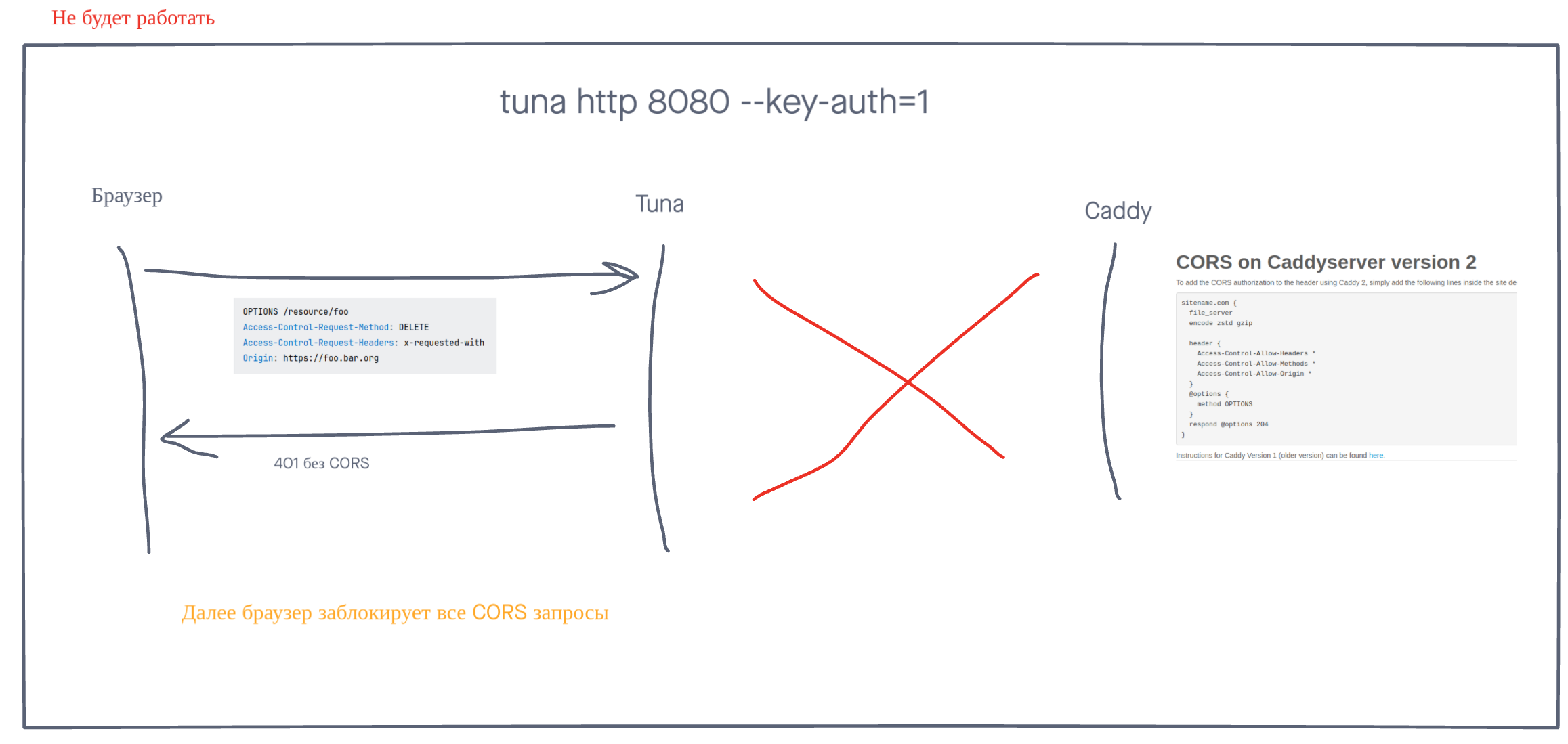
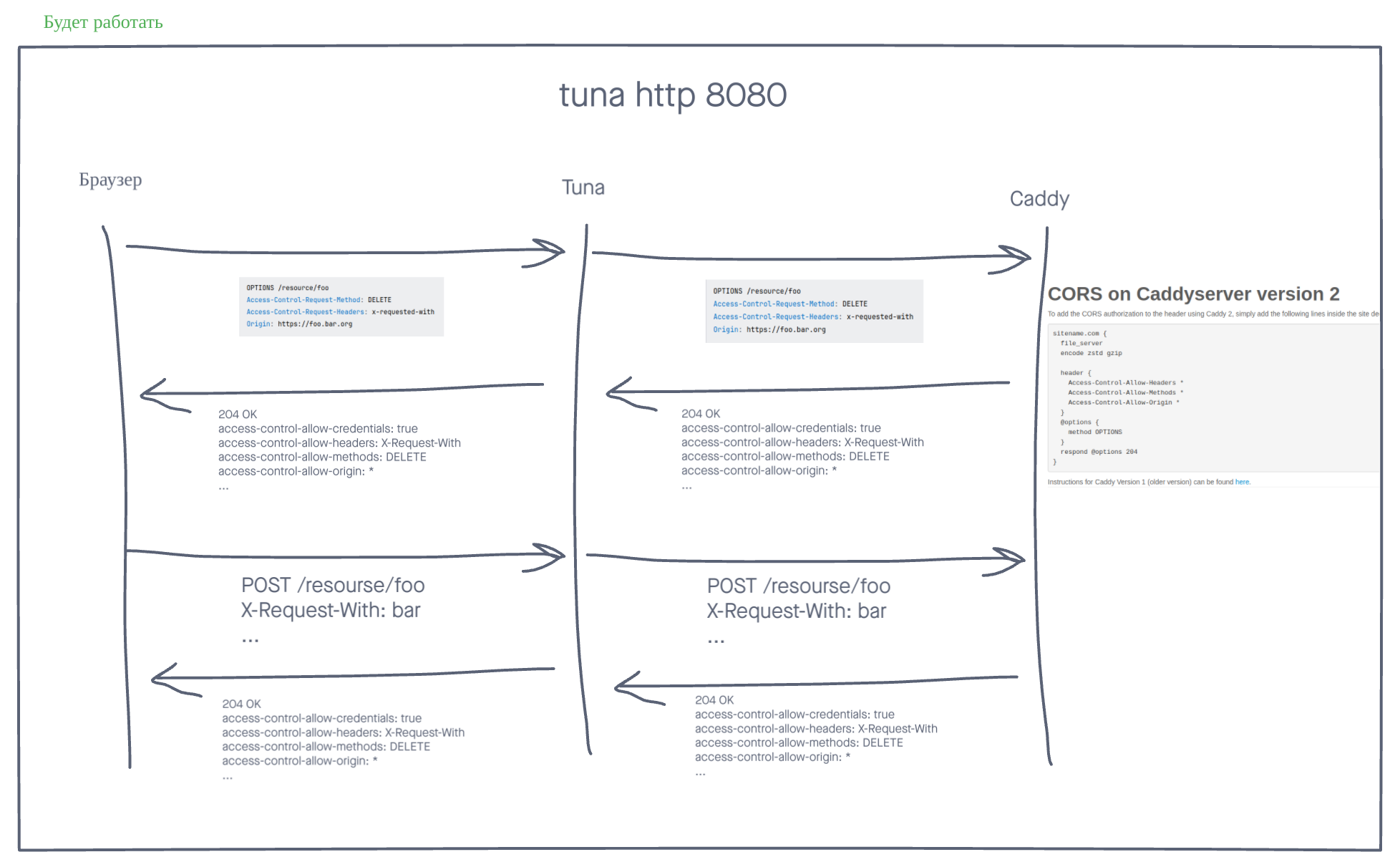
If you want to manage CORS headers yourself on the downstream server and at the same time use authorization in tuna with --basic-auth or --key-auth.
Then Preflight requests - will not work, because these OPTIONS requests do not contain Authorization, X-Token and any other specific headers.
Solution to choose:
- Do not use authorization in tuna.
- Manage CORS headers in tuna, not yourself.
- Handle
OPTIONSand authorization separately using more flexible traffic policies.