Working from the CLI
Overview
The tuna console client lets you interact with Job and Heartbeat monitors directly from the terminal or scripts.
Main commands:
tuna monitor ping— send a Heartbeat signal to a monitortuna monitor exec— run a command and track it as a Job monitortuna monitor status— view monitor statuses
Authorization
To view a monitor's status you need an API key. It can be passed in several ways:
- Environment variable
- Flag
- Config file
export TUNA_API_KEY=your-api-key
tuna monitor ping YOUR_MONITOR_ID
tuna monitor ping YOUR_MONITOR_ID --api-key=your-api-key
# Save the key to the config
tuna config save-api-key your-api-key

# Now you can use it without explicitly passing the key
tuna monitor ping YOUR_MONITOR_KEY
monitor ping
Sends a signal to a Heartbeat monitor.
Syntax
tuna monitor ping MONITOR_ID [flags]
Parameters
| Parameter | Description | Default |
|---|---|---|
MONITOR_ID | Monitor key (required) | — |
--state | State: ping, start, finish, fail | ping |
--message | Additional message | — |
--host | Sender host name | hostname |
Examples
Simple ping
tuna monitor ping MONITOR_ID
With explicit host
tuna monitor ping MONITOR_ID --host=server-01
With a message
tuna monitor ping MONITOR_ID --message="All systems operational"
Different states
# Start of work
tuna monitor ping MONITOR_ID --state=start

# Successful completion
tuna monitor ping MONITOR_ID --state=finish

# Error
tuna monitor ping MONITOR_ID --state=fail
Using in crontab
# Heartbeat every 5 minutes
*/5 * * * * /usr/local/bin/tuna monitor ping MONITOR_ID --host=gitlab-runner
Using in systemd
# /etc/systemd/system/heartbeat.service
[Unit]
Description=Send heartbeat to Tuna

[Service]
Type=oneshot
ExecStart=/usr/local/bin/tuna monitor ping MONITOR_ID
# /etc/systemd/system/heartbeat.timer
[Unit]
Description=Heartbeat timer

[Timer]
OnBootSec=1min
OnUnitActiveSec=5min

[Install]
WantedBy=timers.target
monitor exec
Runs a command and automatically tracks a Job monitor. On start it sends the start signal, on successful completion finish, and on error fail.
Syntax
tuna monitor exec MONITOR_ID [flags] -- COMMAND [ARGS...]
Parameters
| Parameter | Description | Default |
|---|---|---|
MONITOR_ID | Monitor key (required) | — |
--host | Execution host name | hostname |
--no-stdout | Do not send output to the server | false |
Examples
Simple run
tuna monitor exec MONITOR_ID -- ./backup.sh
With explicit host
tuna monitor exec MONITOR_ID --host=backup-server -- ./backup.sh
Without sending logs
tuna monitor exec MONITOR_ID --no-stdout -- ./backup.sh
Command with arguments
tuna monitor exec MONITOR_ID -- pg_dump -U postgres -d mydb -f /backups/dump.sql
Command with a pipe
tuna monitor exec MONITOR_ID -- bash -c 'pg_dump mydb | gzip > /backups/dump.sql.gz'
Using in crontab
# Backup every night at 3:00
0 3 * * * /usr/local/bin/tuna monitor exec MONITOR_ID -- /scripts/backup.sh

# Log cleanup every hour
0 * * * * /usr/local/bin/tuna monitor exec MONITOR_ID -- /scripts/cleanup.sh
Logging
When monitor exec is used the system captures stdout and stderr of the running command. The logs can be viewed in the web UI in the monitor's event history.
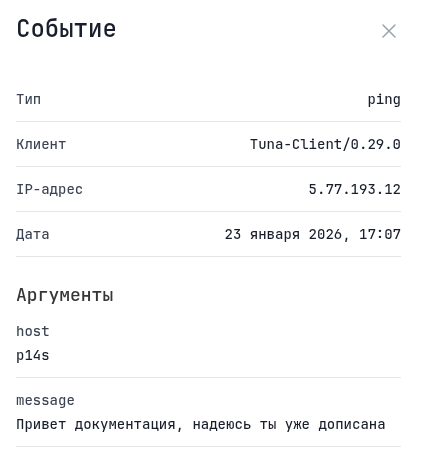
To disable sending logs use the --no-stdout flag:
tuna monitor exec MONITOR_ID --no-stdout -- ./command.sh
Signal handling
monitor exec handles Unix signals correctly:
- On SIGINT, SIGTERM, SIGHUP — the signal is forwarded to the child process
- When the child process exits with a non-zero code —
failis sent - On clean exit (exit code 0) —
finishis sent
monitor status
Shows the status of the team's monitors. To view the status you need an API key.
Syntax
tuna monitor status [MONITOR_ID] [flags]
Parameters
| Parameter | Description | Default |
|---|---|---|
KEY | Specific monitor key (optional) | — |
--api-key | API key for authorization | $TUNA_API_KEY |
Examples
Status of all monitors
tuna monitor status
Status of a specific monitor
tuna monitor status MONITOR_ID
Practical examples
PostgreSQL backup with monitoring
#!/bin/bash
# /scripts/backup-postgres.sh

BACKUP_DIR="/backups/postgres"
DATE=$(date +%Y%m%d_%H%M%S)
DB_NAME="production"

tuna monitor exec MONITOR_ID --host=pg-prod-replica-1 -- bash -c "
    pg_dump -U postgres $DB_NAME | gzip > $BACKUP_DIR/${DB_NAME}_${DATE}.sql.gz

    # Remove old backups (older than 7 days)
    find $BACKUP_DIR -name '*.sql.gz' -mtime +7 -delete
"
File synchronization
#!/bin/bash
# /scripts/sync-files.sh

tuna monitor exec MONITOR_ID -- rsync -avz --delete /data/ backup-server:/backups/data/
Monitoring a service in Docker
#!/bin/bash
# healthcheck.sh inside the container

# Check application health
if curl -sf http://localhost:8080/health > /dev/null; then
    tuna monitor ping MONITOR_ID --message="healthy"
else
    tuna monitor ping MONITOR_ID --state=fail --message="unhealthy"
fi
Monitoring GitLab Runner
# In crontab on the GitLab Runner machine
*/5 * * * * /usr/local/bin/tuna monitor ping MONITOR_ID --host=raspberry-pi --message="Runner active"